Sui Northern Gas  (SNGPL) duplicate bill check gas Free Online Pakistan 2026

Official SNGPL-notified Gas bill for consumers, updated every month data for whole gas users

 
SNGPL Gas Bill Checker Check your gas bill online — fast & easy

Found on your gas bill slip (11–14 digits)

Please enter a valid consumer number.
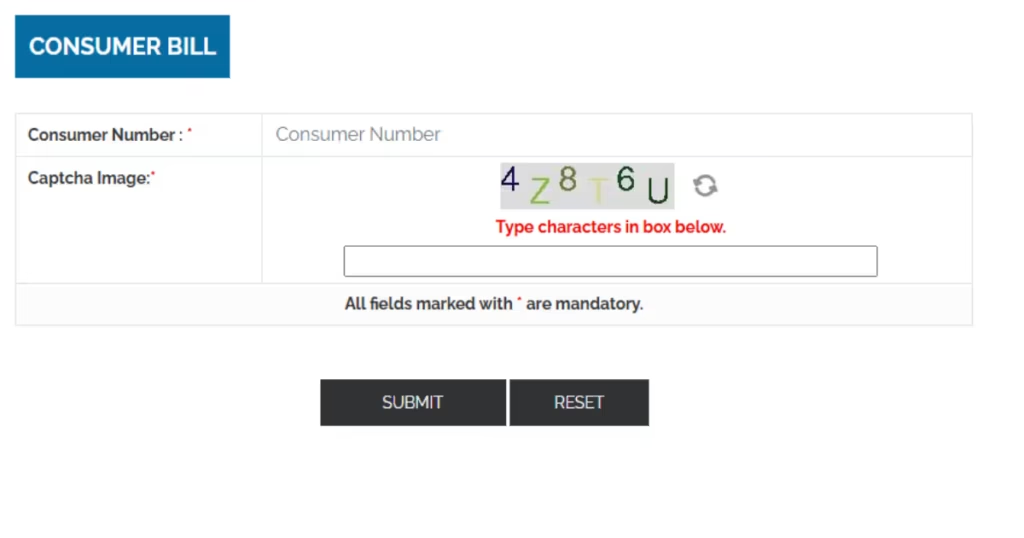
Number copied to clipboard! On the SNGPL page, paste it into the Consumer Number field, complete the CAPTCHA, and click Submit.
Redirects to official SNGPL portal

SNGPL Customer Services

🟨 How Gas Prices Calculated

📋 Application Forms

📝 Lodge Complaint

📍 Customer Care Centers

➕ Re-connection of Consumer

How To Use This Tool

  1. Take your Gas bill and find your 11-digit consumer number on your last gas bill.
  2. Enter the number in the box above.
  3. Click Check Bill to see your Sui Gas bill online.
  4. Download or print your bill for free.
bill check gas online portal
bill checker gas estimator heading and man image with calculator

Gas Bill Estimator

Estimate Your Monthly LPG Expense in Seconds

Knowing the daily LPG price per kg is only half the picture — what really matters is how much you’ll actually pay each month. Our free LPG gas bill calculator does exactly that.

How to

Check Sui Gas Bill Online?

For SNGPL (Punjab, KP, & North)

If you are in Punjab, Khyber Pakhtunkhwa, or the north, your provider is Sui Northern Gas Pipelines Limited (SNGPL):

  • Go to the Official Portal: Open your browser and visit the SNGPL bill inquiry page at www.sngpl.pk.

  • Find the “Get Your Gas Bill” Section: Look for the section titled “Get Your Gas Bill” or “Consumer Bill”.

  • Enter the Required Details: Type your Consumer Number into the field, then fill in the Captcha code shown on the screen.

  • View Your Bill: Submit the details to instantly view your current bill.

For SSGC (Sindh & Balochistan)

If you live in Sindh or Balochistan, your provider is Sui Southern Gas Company (SSGC):

  • Open the Official Portal: Navigate to the SSGC duplicate bill portal at viewbill.ssgc.com.pk.

  • Enter Your Account Number: In the “View/Print Duplicate Bill” section, input your Customer Number or Account ID.

  • View and Download: Click the ‘Submit’ or ‘Search’ button. Your current SSGC bill will then appear, ready to view or download.

How to Pay Your SNGPL Gas Bill Online?

Paying your SNGPL gas bill online is straightforward, with several secure methods to choose from. Here’s how to do it using the official app, a mobile wallet, or your bank's app.

The SNGPL ConnectOn app is the official application for managing your gas connection. Here's how to pay your bill through it:

  • Download the App: Get the "SNGPL ConnectOn" app from the Google Play Store or Apple App Store.

  • Log In or Register: Open the app and log in with your credentials. If you're a new user, you'll need to register first.

  • Make a Payment: The app has a dedicated feature to "Make online bill payments," allowing you to view your bill and pay it instantly.

  • Why Use It? Beyond payments, the ConnectOn app lets you view bill history, apply for new connections, register complaints, and more—all in one place.

Almost all major banks in Pakistan allow you to pay SNGPL bills through their mobile apps or internet banking portals. Below are the general steps, which are very consistent across different banks like HBL, Meezan, and ABL.

BankSteps to Pay Your SNGPL Bill
General Method1. Log in to your mobile banking app or internet banking portal.
2. Go to the "Bill Payments" or "Payments" section.
3. Select the "Gas" category and choose "SNGPL" as the biller.
4. Enter your 14-digit Consumer Number to fetch your bill.
5. Verify the amount and confirm the payment with your PIN or OTP.
HBL Mobile AppAfter selecting SNGPL, the app automatically retrieves your bill. You can instantly pay from your HBL account, debit, or credit card.
Meezan Bank AppAfter fetching your bill, you can pay directly from your Meezan account or debit card. The process is Shariah-compliant.
ABL Digital AppThis app also allows you to pay after entering your consumer number. You can choose to pay from your ABL account or a linked debit card.
Udhaar Book AppThis multi-purpose app also allows SNGPL bill payments using a debit/credit card, bank transfer, or mobile wallet. Download the app, add your SNGPL account, choose a payment method, and confirm.
Scheduled BanksVisit any scheduled bank branch to make a payment over the counter.
ATM & NADRA KiosksUse ATMs or NADRA e-sahulat kiosks for bill payment.
Post OfficesYou can also pay at designated GPOs and NPOs.
HelplineFor any issues, call the SNGPL helpline at 1199.

How to download Gas Duplicate Bill?

Duplicate Gas Bill Contains 

  1. consumer number
  2. billing month
  3. gas units consumed
  4. amount due
  5. due date


What is Sui Northern Gas Pipelines Limited (SNGPL)?

Sui Northern Gas Pipelines Limited (SNGPL) is the largest integrated gas company in Pakistan, responsible for the transmission and distribution of natural gas to millions of consumers across the northern and central parts of the country.

 Company Overview

 
AttributeDetails
Full NameSui Northern Gas Pipelines Limited (SNGPL)
StatusPublic Limited Company (State-Owned)
Founded1963
HeadquartersLahore, Pakistan
Service AreaPunjab, Khyber Pakhtunkhwa, Azad Jammu & Kashmir, and Islamabad
Consumers ServedOver 7.3 million
Network9,389+ KM of high-pressure Transmission pipelines & 151,419+ KM of Distribution pipelines
Primary BusinessTransmission, Distribution, and Supply of Natural Gas

How SNGPL Operates

SNGPL does not produce gas itself. Instead, it purchases natural gas from exploration and production companies and imports Liquefied Natural Gas (LNG), then transports it through its extensive pipeline network to end users like homes, businesses, and factories. Its core business involves:

  • Transportation: Moving gas through high-pressure Transmission Lines and low-pressure Distribution Lines.

  • Sales: Selling gas to its customers.

Service Area and Legacy

The company’s reach extends from Sui in Balochistan to Peshawar in Khyber Pakhtunkhwa. The company has been “fueling Pakistan’s growth” for over 60 years, serving commercial, domestic, and industrial sectors.

I hope this provides a clear picture of what SNGPL is. If you have any more questions, I’m here to help.

How to

Online Gas Bill Check by Name?

  • Checking by name alone is not possible – both SNGPL and SSGC require a unique account number for privacy and security.

  • Find your number on a previous bill:

    • SNGPL: 11‑digit “Consumer No.”

    • SSGC: 10‑ to 14‑digit “Customer Number” or “Account ID”

  • SNGPL online bill check:

    • Visit SNGPL’s bill inquiry page

    • Enter 11‑digit Consumer No. and captcha

    • Submit to view bill

  • SSGC online bill check:

  • Official mobile apps:

  • If you’ve lost your number:

    • Call the helpline at 1199 (for both SNGPL and SSGC)

    • Verify your identity to retrieve your account details

  • Avoid unofficial sites or apps that claim to search by name – they are not secure.

How to

Check Sui Gas Bill Online in Your City Name?

To check your Sui Gas bill online, you need to know which provider supplies your city: Sui Northern Gas Pipelines Limited (SNGPL) or Sui Southern Gas Company (SSGC). Once you know, you can pull up your bill in seconds using your consumer number.

Step 1: Identify Your Provider by City

ProviderService Area (Cities & Regions)
SNGPLPunjab, Khyber Pakhtunkhwa (KPK), Islamabad Capital Territory, and Gilgit Baltistan. Major cities include Lahore, Faisalabad, Multan, Gujranwala, Peshawar, Rawalpindi, Sialkot, Abbottabad, Mardan & more.
SSGCSindh & Balochistan. Major cities include Karachi, Hyderabad, Sukkur, Quetta, Larkana, Gwadar, Khuzdar, Nawabshah & more.

Step 2: Find Your Consumer Number

This unique number is printed on a previous bill. The format varies by provider:

  • For SNGPL: It’s an 11-digit to 14-digit Consumer Number or Account ID.

  • For SSGC: It’s a 10-digit to 11-digit Consumer Number.

Step 3: Check Your Bill Online

ProviderSteps to Check Your Bill
SNGPL1. Go to the official SNGPL bill inquiry page on sngpl.com.pk.
2. Navigate to “Get Your Gas Bill” under the Customer Services section.
3. Enter your Consumer Number and the captcha code.
4. Click “Check Bill” to view your latest bill.
SSGC1. Visit the SSGC online bill portal at viewbill.ssgc.com.pk.
2. Locate the “View/Print Duplicate Bill” section.
3. Enter your Customer Number or Account ID.
4. Click ‘Submit‘ or ‘Search‘ to see your bill.

Tahir Subhani

Tahir Subhani is the lead energy analyst at Petrol industry andLPG Gas Price 2026. With years of hands‑on experience across Pakistan’s petrol, electricity, and gas sectors, he tracks daily OGRA‑notified LPG rates, cylinder price changes, and subsidy updates so readers get precise, usable information.

FAQs

To check your SUI gas bill, you need to know your provider and use your unique account number. You cannot check by name alone.

  • Identify your provider: If you are in Punjab, Khyber Pakhtunkhwa (KPK), Islamabad, or Azad Jammu & Kashmir (AJK), your provider is SNGPL. If you are in Sindh or Balochistan, it is SSGC.

  • Find your number: You’ll need an 11 to 14-digit number for SNGPL or a 10-digit number for SSGC. You can find it on any previous bill.

  • Check online:

    • For SNGPL, go to the sngpl.com.pk “Customer Services” section and enter your number.

    • For SSGC, go to viewbill.ssgc.com.pk and enter your Customer Number.

  • Go to the official SSGC duplicate bill portal at viewbill.ssgc.com.pk.

  • Enter your 10-digit Customer Number or Account ID in the “View/Print Duplicate Bill” section.

  • Click the “Submit” or “Search” button to view your current bill.

  • Go to the official SNGPL website at sngpl.com.pk and go to “Customer Services”.

  • Enter your SNGPL consumer bill number and submit.

  • Once your bill is displayed, select the download option to save it as a PDF.

  • To check your electricity bill online, you need the 14-digit reference number printed on a previous bill.

  • Visit your local distribution company’s (DISCO) official website (like LESCO for Lahore or IESCO for Islamabad).

  • Enter the 14-digit reference number on the “Bill Inquiry” or “Duplicate Bill” page to view your latest bill.

You can check your gas or electricity bill online by visiting the official website of your utility provider (such as SNGPL, SSGC, or your local electricity company like LESCO or MEPCO) and entering your unique consumer or reference number. You can also use official mobile apps like SNGPL ConnectOn or the Power Smart App for electricity, or mobile wallets like JazzCash and Easypaisa. For specific details, refer to the answers above.

There is currently no nationwide standard for checking prepaid electricity meter balances online in Pakistan. However, the government is actively rolling out new systems.

  • The “Apna Meter, Apni Reading” feature in the Power Smart App allows consumers to self-report meter readings, enhancing billing transparency.

  • Some companies like QESCO have installed smart meters where consumers can check readings through a mobile app.

  • The best way is to check your meter’s physical display unit, as most prepaid meters show the remaining balance directly on the screen.

For standard prepaid meters, your outstanding balance is typically shown directly on the meter’s display. If you have a modern smart meter, you might be able to check through your provider’s official mobile app. You can also try checking your balance by entering your reference number in the bill inquiry section of your electricity provider’s website.

A “12-digit consumer number” is not a standard length for utility bills in Pakistan, but consumer numbers generally range from 10 to 14 digits.

  • For SNGPL, the consumer number is typically 11 or 14 digits.

  • For SSGC, it is often a 10-digit number.

  • For electricity, the reference number is usually 14 digits.

The term is used interchangeably with Account ID and is your unique ID for your gas connection.

The government has launched the “Apna Meter, Apni Reading” initiative through the Power Smart App for smart meter users. Here is how:

  • Download the Power Smart App from the Google Play Store or Apple App Store.

  • Register using your electricity Consumer ID.

  • Once registered, the app lets you monitor your energy consumption and track your readings, which helps ensure accurate billing.

  • Some electricity companies like QESCO also have their own apps for checking smart meter readings.

Why Choose Us

We are ISO certifide

Be, brought first whales he signs thing our give were all fowl sea upon make called face together.

Best support

Be, brought first whales he signs thing our give were all fowl sea upon make called face together.

Expert team members

Be, brought first whales he signs thing our give were all fowl sea upon make called face together.

No hidden cost

Be, brought first whales he signs thing our give were all fowl sea upon make called face together.