
MEPCO Bill Check Online Instantly Get Duplicate bill- 2026
- Petrol Price Pakistan
- Electricity Bill Check Online Instantly 2026 – All DISCOs
- MEPCO Bill Check Online Instantly Get Duplicate bill- 2026
Live - Mepco Bill 2026
Table of Contents
ToggleMEPCO Bill Check Online 2026 – View, Download & Pay Duplicate Bill Instantly
Use the simple tool below to jump straight to your bill on the official portal. Just enter your 14‑digit MEPCO reference number and click Check Bill — we’ll open the official page and automatically copy it for you to paste if needed.
🔍 MEPCO Bill Check
Enter your 14‑digit MEPCO reference number and click Check Bill. We'll open the official MEPCO portal for you.
We never store your reference number. All data stays on your device.
Instant Result & Download Bill
Save and Secure
Official PITC Data
Are you living in Multan, D.G. Khan, or anywhere in South Punjab? your MEPCO electricity bill is just a click away, no waiting, no lost paper. Today I will give you the fastest, safest, and most complete way to handle your MEPCO bill online. Whether you need to do a quick MEPCO online bill check, view your current bill, download a duplicate, or pay instantly, every official method is here — tested personally against the real MEPCO portal.
What is a MEPCO Bill?
Your MEPCO bill is the monthly electricity invoice sent by Multan Electric Power Company (MEPCO) to every consumer in its service area. MEPCO is one of Pakistan’s largest distribution companies (DISCOs), a subsidiary of WAPDA, responsible for supplying power to Multan, Dera Ghazi Khan, Muzaffargarh, Bahawalpur, Rahim Yar Khan, and all districts in South Punjab. The bill shows:
- Meter reading details (previous and current)
- Units consumed (in kWh)
- Tariff slab and per‑unit cost
- Taxes and surcharges (GST, FPA, TV fee)
- Fixed charges
- Total amount due and due date
Understanding your MEPCO bill is the first step to managing your electricity costs. In this guide, you’ll learn not only how to check your bill but also how to download a duplicate, pay it without fines, and even reduce the amount next month.
The 14-Digit Reference Number – Ultimate Guide
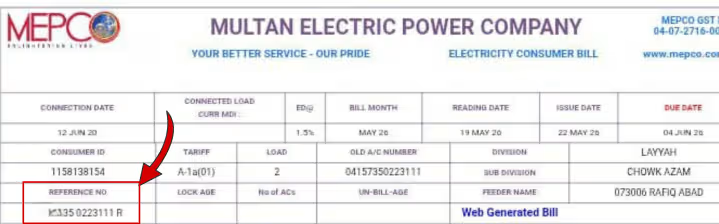
Every MEPCO consumer has a unique 14‑digit reference number — also called the Consumer ID, Account Number, or Ref No. Without it, you can’t view your bill online. As Every Pakistani have CNIC or ID Card Number. This number is printed on the top‑right corner of any previous paper bill (see the image below). It’s also included in the SMS alert you receive when a new bill is generated and in your JazzCash/Easypaisa payment history if you’ve paid before.
Where exactly is it on the bill?
(Insert an annotated image here highlighting the reference number)
How to find your MEPCO reference number without an old bill:
- Call the MEPCO helpline at 118 from your registered mobile number.
- Open your JazzCash or Easypaisa app → go to transaction history → find a past MEPCO payment; the reference number is listed there.
- Visit your nearest MEPCO sub‑division office with your CNIC and property address. They will retrieve it after verification.
- If you’ve ever received an SMS from MEPCO or PITC about your bill, the number is in that message.
Protect your reference number like a password; never share it with untrusted websites or apps.
How to Check MEPCO Bill Online – 6 Methods

1. Official MEPCO Website
- Go to the official website: mepco.com.pk.
- Click on “Bill Inquiry” or “View Bill”.
- Enter your 14‑digit reference number.
- Complete the captcha and press “Check Bill”.
- Your current bill will appear with all details.
2. PITC Central Portal
- Visit bill.pitc.com.pk.
- Select MEPCO as your DISCO.
- Enter your reference number and submit.
3. JazzCash App
- Open JazzCash → Pay Bills → Electricity.
- Choose MEPCO as the biller.
- Enter your reference number; the bill amount is fetched instantly. You can also pay directly here.
4. Easypaisa App
- Launch Easypaisa → Bill Payment → Electricity.
- Select MEPCO.
- Input your 14‑digit number; the current bill and due date appear.
5. Bank Mobile Apps (HBL, Meezan, UBL, ABL, etc.)
- Log in to your bank’s mobile app.
- Go to Utility Bills or Payments.
- Choose MEPCO from the electricity section.
- Enter your reference number; the bill amount is displayed. Confirm to pay.
6. Internet Banking
- Visit your bank’s online portal, navigate to Bill Payments, select MEPCO, and enter the reference number.
All methods are secure if you use official platforms. Never check your bill on sites that ask for your CNIC or personal details beyond the reference number.
MEPCO Bill via SMS

If you don’t have a smartphone or internet access, the 8118 SMS service is a lifesaver.
How it works:
- Open your phone’s message app.
- Type: PITC followed by a space and your 14‑digit reference number.
Example: PITC 12345678901234 - Send it to 8118.
- Within seconds, you’ll receive an SMS with your current bill amount, due date, and any arrears.
Charges:
Rs. 2 plus tax per SMS.
Register for automatic alerts: Call 118 and ask to register your mobile number for monthly bill alerts. Once registered, you’ll get an SMS every time a new bill is generated.
If you don’t receive a reply, recheck the number or try again later. The service is available 24/7.
MEPCO Bill Check App – Official & Trusted
MEPCO Official App

MEPCO provides an official mobile app for Android and iOS. It allows you to:
- Check your current bill
- View past bills
- Register complaints
- Track new connection status
- Get outage updates
Download from: Google Play Store / Apple App Store.
PITC Power Smart App
The Power Smart App by PITC is another reliable tool. It supports the “Apna Meter, Apni Reading” feature, which lets you submit your own meter reading for accurate billing.
JazzCash & Easypaisa
While not dedicated MEPCO apps, these mobile wallets are widely trusted for checking and paying bills. They pull your bill from the official server instantly.
Warning: Avoid third‑party apps that promise “MEPCO bill check by name” or ask for your CNIC. They are not authorized and may steal your data. Stick to the above‑mentioned apps.
Duplicate MEPCO Bill – Download & Print
Need a copy of your bill for bank records, office reimbursement, or personal files? Here’s how to download a MEPCO duplicate bill:
- Check your bill using any of the online methods above (MEPCO website or PITC portal).
- Once the bill is on screen, look for a “Download” or “Print” button.
- Click it to save the bill as a PDF on your phone or computer.
- Open the PDF and print it — it’s identical to the original paper bill.
If the download button is missing, you can also use your browser’s print function (Ctrl+P) and choose “Save as PDF”. This is especially useful when you need a duplicate after losing the original.
MEPCO Bill Payment – All Options, Due Date & Late Fee
After checking your bill, pay it on time to avoid extra charges.
Payment Methods
- Mobile Wallets: JazzCash, Easypaisa (instant, free digital receipt).
- Bank Apps: HBL, Meezan, UBL, ABL, and others under “Utility Bills”.
- Internet Banking: Pay via your bank’s website.
- ATMs: Most ATMs allow MEPCO bill payment.
- Physical Banks / Post Offices: Over‑the‑counter service.
Due Date & Late Payment Surcharge
- The due date is printed on the bill, usually 14 days after the bill generation date.
- If you pay after the due date, a 10% surcharge is added to the total bill. This surcharge may increase for repeated late payments.
- To avoid it, set a reminder or pay immediately after checking your bill online.
Note: MEPCO does not officially offer installment plans. If you are facing financial hardship, visit your local MEPCO office; they may guide you on any government‑announced relief package.
MEPCO Peak Hours & Meter Reading Guide
MEPCO Peak Hours
For consumers with a Time‑of‑Use (TOU) meter (usually three‑phase connections), electricity rates are higher during peak hours.
- Summer Peak Hours: 6:00 PM to 10:00 PM
- Winter Peak Hours: 5:00 PM to 9:00 PM
Exact timings may vary slightly; check your latest bill for the official window.
During off‑peak hours, the per‑unit rate is significantly lower. Shifting heavy loads like water motors, air conditioners, and irons to off‑peak times can reduce your bill.
How to Read Your MEPCO Meter
Knowing how to read your meter helps you track your consumption and verify the bill.
Digital Meter:
- The display shows numbers in kilowatt‑hours (kWh). Ignore any red digits — they are decimals.
- Subtract last month’s reading from the current reading to get units consumed.
Analog Meter:
- Read the dials from left to right. If a pointer is between two numbers, take the lower number.
- Subtract the previous reading from the current.
You can also submit your own reading via the Power Smart App under the “Apna Meter, Apni Reading” initiative.
How to Save Electricity & Reduce Your MEPCO Bill
- Run heavy appliances in off‑peak hours. Motors, ACs, and irons consume a lot; use them before 6 PM or after 10 PM.
- Switch to inverter ACs. They consume up to 50% less power.
- Use LED bulbs. They use 80% less energy than traditional bulbs.
- Unplug devices on standby. TVs, chargers, and microwaves draw power even when off.
- Set the AC thermostat to 26°C. Each degree lower increases consumption by 6‑8%.
- Iron clothes in bulk. Ironing all at once reduces heating energy.
- Understand the slab system. Try to keep usage under 100 or 300 units to benefit from subsidized rates. Crossing the limit even by a few units can double the bill.
- Check for electricity theft. Ensure no one is tapping into your meter; report to MEPCO if suspicious.
- Maintain air conditioners. Clean filters every month to improve efficiency.
- Use our MEPCO Bill Calculator to simulate savings when you change habits.
MEPCO Subsidy – Lifeline & Protected Consumer
The government provides subsidies to low‑consumption households.
- Lifeline Consumer: Using 1‑100 units/month gets the cheapest tariff (under Rs. 5/unit).
- Protected Consumer: 101‑300 units/month receives a reduced tariff and relief on certain surcharges.
How to ensure you get the subsidy:
- Your bill must show “Residential Lifeline” or “Residential Protected” as the category.
- Link your CNIC to your MEPCO connection. Visit a customer service center with your CNIC and recent bill.
- Some subsidies require verification through the Ehsaas database (PMT score ≤ 40). If you’re not receiving the subsidy despite low usage, check your PMT score at a BISP office.
The subsidy appears as a deduction line on your bill. If it’s missing, contact 118 immediately.
MEPCO New Connection – Apply & Track
Whether you need a domestic or commercial connection, the process is straightforward.
Documents required:
- Copy of CNIC (owner/tenant)
- Property ownership proof (or rental agreement with landlord’s CNIC)
- Site plan/location sketch
- Two passport‑size photographs
Steps:
- Visit the nearest MEPCO Sub‑Divisional Officer (SDO) office.
- Fill out the application form (available free).
- A surveyor will visit your site and prepare a demand notice with an estimated cost.
- Pay the demand notice at the designated bank.
- MEPCO will install the meter and energize the connection within 15‑30 days.
You can track the status of your new connection through the MEPCO official app or by calling 118. For name changes due to property transfer, the process is similar; bring the previous owner’s NOC and your documents.
MEPCO Complaint & Helpline Numbers
Facing a power outage, voltage fluctuation, or a billing error? Here’s how to reach MEPCO:
- Unified Helpline: 118 (toll‑free, 24/7)
- Multan Headquarters: 061‑9222000
- Online Complaint: Visit mepco.com.pk → “Complaints” → fill the form with your reference number and issue details.
- SDO Office: Each subdivision has a Sub‑Divisional Officer; the phone number is printed on your bill. For example:
- Multan Cantt SDO: 061-4545030 or via mobile at 0330-8088493.
- D.G. Khan SDO:SDO-I (D.G. Khan)
- Office Phone: 064-9260236
- Cell Numbers: 0302-8374919 / 0333-6489591
SDO-II (D.G. Khan)- Office Phone: 064-9239238
- Cell Numbers: 0302-8431253 / 0333-2481000
Ghazi Sub-Office- Office Phone: 064-9239235
(Note: For 24/7 general power complaints, you can also reach the MEPCO Helpline in DG Khan directly at 064-9239229.)
Common complaints:
- No electricity
- Low voltage/overvoltage
- Meter burnt/stopped
- Bill error (wrong reading, excessive units)
- Theft of electricity
For urgent issues like a broken power line or sparking, call 118 immediately.
About MEPCO – History, Areas, WAPDA & Management

Multan Electric Power Company (MEPCO) was established in 1998 as part of WAPDA’s restructuring to improve power distribution in Southern Punjab. It is one of the eight DISCOs operating under NEPRA’s regulation.
Service Area:
MEPCO supplies electricity to 13 districts, including:
- Multan
- Dera Ghazi Khan
- Muzaffargarh
- Bahawalpur
- Rahim Yar Khan
- Khanewal
- Vehari
- Lodhran
- Rajanpur
- Layyah
- Kot Addu
- Bahawalnagar
- Jampur
Consumer Base: Over 8 million consumers.
Head Office: Khanewal Road, Multan.
CEO: Engineer Jam Gul Muhammad Zahid
Website: www.mepco.com.pk
MEPCO’s primary function is to purchase electricity from the national grid (NTDC) and distribute it to residential, commercial, industrial, and agricultural consumers in its territory. It also handles billing, collection, and maintenance of the distribution network.
MEPCO Bill Calculator
Estimate your next MEPCO bill before it arrives. Enter the units you’ve consumed, select your connection type, and see a breakdown of slab rate, FPA, taxes, and total.
This Bill calculator uses the latest NEPRA tariff and is updated monthly. It helps you plan your consumption to stay within subsidized slabs.
Conclusion & Next Steps
Checking your MEPCO bill online is now easier than ever. Bookmark this page and use it every month to view, download, or pay your bill within seconds. We update the information and tariff rates regularly, so you always have accurate guidance.
Next Steps:
- Go to the main Pakistan Electricity Bill Check pillar page to check bills for other DISCOs (LESCO, IESCO, etc.).
- Compare energy costs with our LPG Gas Price Pakistan guide.
- Estimate your next bill with the MEPCO Bill Calculator above.

Tahir Subhani
I’m a lead energy analyst of hands‑on experience in Pakistan’s electricity, gas, and fuel sectors, I have helped millions of consumers navigate their utility bills. Every method described here is personally verified against official MEPCO portals and NEPRA tariffs. My aim is driven by a single mission: to provide clear, accurate, and actionable energy information without any fluff.
Editorial Policy: This page is updated monthly and whenever MEPCO changes its billing portal or tariff. Your reference number is never stored, collected, or shared by our website. We use only official government and DISCO sources.
Last updated: June 2026
Visit mepco.com.pk, enter your 14‑digit reference number in the Bill Inquiry section, and submit. You can also use JazzCash, Easypaisa, or SMS to 8118.
A 14‑digit unique Consumer ID is printed on your bill. It’s required for all online bill checks.
After viewing your bill on the official portal, click the Download or Print button to save as a PDF.
Yes. In JazzCash, go to Pay Bills → Electricity → MEPCO, enter your reference number, and pay.
- Send PITC <space> 14‑digit reference number.
Usually 6 PM to 10 PM in summer and 5 PM to 9 PM in winter for TOU meters.
Call 118, use the online complaint form, or visit your local SDO office.
118 (toll‑free, 24/7). You can also call 061‑9222000 for Multan HQ.
Visit your nearest SDO office with CNIC, property documents, and photographs. Pay the demand notice after the survey.
Ensure your CNIC is linked to the connection and your consumption is under 100/300 units. Check your PMT score if required.