
Pakistan Electricity Bill Check Online – All DISCOs (MEPCO, LESCO, GEPCO, IESCO & More)
Your electricity bill may get delayed, lost, or damaged. But now you do not need to worry. I’m going to inform you of every method to get your electricity bill online without any hesitation.
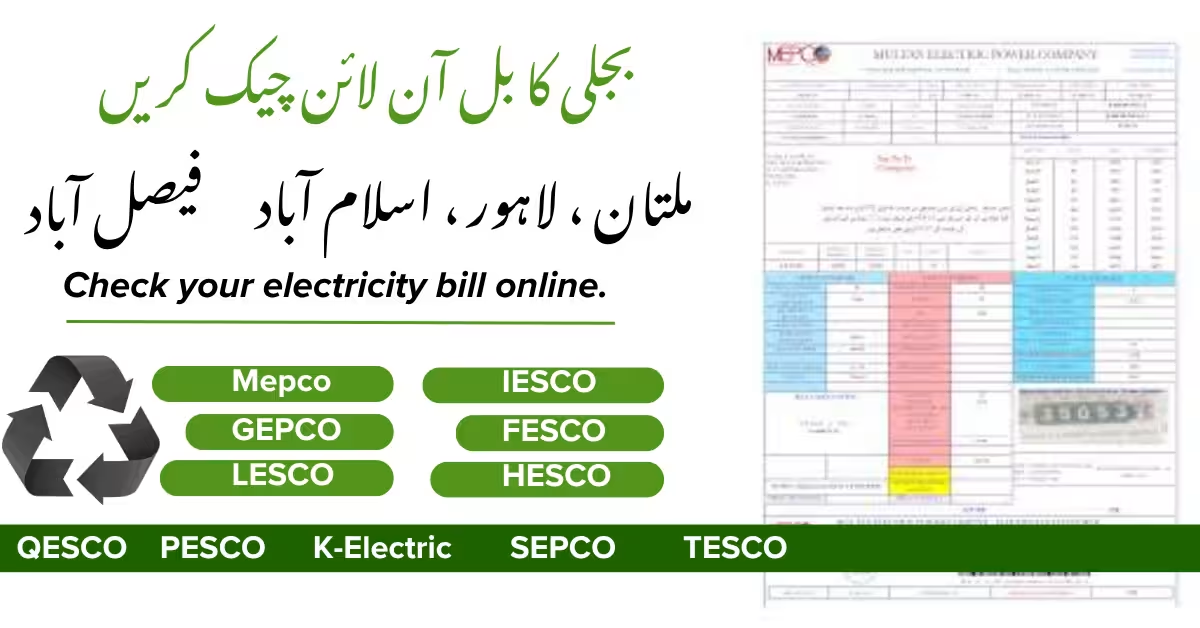
Choose Your DISCO — Official Portal and Full Guide
We have separate, detailed pages for each DISCO, containing step-by-step instructions, local helpline numbers, complaint contacts, and duplicate bill download guides. Click on your provider’s link below.
| DISCO | Service Area (Cities & Region) |
|---|---|
| MEPCO | Multan, D.G. Khan, Muzaffargarh, Bahawalpur, Rahim Yar Khan |
| GEPCO | Gujranwala, Sialkot, Hafizabad, Gujrat |
| LESCO | Lahore, Sheikhupura, Kasur, Nankana Sahib |
| IESCO | Islamabad, Rawalpindi, Jhelum, Attock |
| FESCO | Faisalabad, Jhang, Mianwali, Bhakkar |
| HESCO | Hyderabad, Jamshoro, Thatta, Badin |
| QESCO | Quetta, Pishin, Khuzdar, Turbat (and all Balochistan) |
| PESCO | Peshawar, Mardan, Abbottabad, Swat |
| K-Electric | Karachi |
| SEPCO | Sukkur, Larkana, Shikarpur |
| TESCO | Tribal Areas (Khyber, Kurram, etc.) |
If you are not sure which DISCO serves your area, look at the city names in the table — your city will fall into one of these service areas.
Table of Contents
Toggle- Electricity
- Oil Price
- Updates
Quick Bill Checker — Select Your DISCO
In the tool below, enter your 14-digit reference number and select your DISCO from the dropdown. Then click the “Check Bill” button — you will go straight to the official portal. If the portal does not fill the number automatically, do not worry; the reference number will be automatically copied to your clipboard, so you can just paste it there.
We respect your privacy.
We never see or store your reference number. Everything stays on your own device.
What Is the 14-Digit Reference Number and Where to Find It
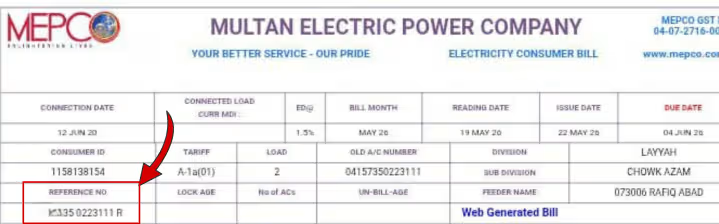
- Every electricity consumer in Pakistan — whether under MEPCO, LESCO, or K-Electric — has a unique 14-digit reference number.
- This is your personal identifier.
- You can find this number on any previous paper bill, usually at the top right corner, near your name and address.
- Some DISCOs label it as “Consumer ID”, “Account Number”, or “Reference No.” It also appears in the SMS alert you receive when a new bill is generated.
- If you have lost the bill, you can still retrieve the number from an old payment receipt or from your JazzCash/Easypaisa transaction history.
- Without this number, you cannot check your bill online, and this rule protects your privacy.
Check Your Electricity Bill in One Minute — From Your Home
On this page, we have gathered the official method for every major DISCO — MEPCO, LESCO, GEPCO, IESCO, FESCO, HESCO, QESCO, PESCO, and K-Electric — all in one place. You only need your 14-digit reference number, and we will show you exactly where to check your bill, how to download a duplicate copy, and how to pay instantly through JazzCash or Easypaisa.
Our promise: this page is updated regularly, based entirely on official sources, and your personal data is never stored. Simply press the blue button, choose your DISCO, and see your bill right away.
Five Easy Ways to Check Any DISCO Bill Online
These methods work across Pakistan — only the DISCO name changes. Follow the instructions for your own provider using the list below.
1. Use the Official DISCO Website
Each DISCO has a “Bill Inquiry” or “View Bill” page on its official website. Enter your 14-digit reference number, submit it, and your current bill will appear on screen. We have listed each DISCO’s official website link further down this page.
2. PITC Central Portal (One Place for All)
The WAPDA/PITC centralized portal at bill.pitc.com.pk serves many DISCOs. Visit the site, select your DISCO, enter your reference number, and view your bill. Sometimes it links directly to your DISCO’s own billing system. If the PITC link does not work, use the official DISCO site directly.
3. Mobile Wallets — JazzCash and Easypaisa
This is the fastest and most popular method in Pakistan.
- JazzCash: Open the app → “Pay Bills” → “Electricity” → choose your DISCO (like MEPCO, LESCO) → enter the reference number → view the bill and pay.
- Easypaisa: Open the app → “Bill Payment” → “Electricity” → select your DISCO → enter the reference number → verify the bill and pay.
You receive a digital receipt immediately.
4. Bank Mobile Apps or Internet Banking
Almost all major banks — HBL, Meezan Bank, UBL, ABL, and others — have a “Utility Bills” section inside their apps. Select “Electricity”, pick your DISCO, enter your reference number, and the bill is fetched. You can then pay directly from your bank account or debit card.
5. SMS Service (8118) — Check Without Internet
If your phone is not a smartphone or you have no internet, there is a simple solution. Open your messaging app and type:
text
PITC [space] your-14-digit-reference-number
Send this to 8118. Within seconds, you will receive an SMS with the bill amount, due date, and any arrears (if applicable). This service works for most DISCOs. However, always check your latest paper bill for the correct SMS shortcode, as it can change occasionally.
Note: Standard SMS charges apply (usually around Rs. 2 plus tax).
Understanding Your Electricity Bill — Slabs, Peak Hours, and Taxes
Seeing your bill is not enough; understanding it helps you manage your monthly expenses.
Slab Rates — The More You Use, the Higher the Per-Unit Cost
Pakistan’s electricity rates use a slab system:
First 100 units: cheapest (lifeline rate)
101-200 units: slightly higher
201-300 units: medium rate
301-700 units: higher rate
Above 700 units: most expensive (peak slab)
Each slab has a higher per-unit price. So, if your consumption is near 200 units, trying to stay under that limit can save a noticeable amount, because even one extra unit can push the entire bill into the next slab.
Peak and Off-Peak Hours
Some connections, especially three-phase meters, have a time-of-use meter. These meters divide the day into “peak hours” (usually from 6 PM to 10 PM, though the exact window varies with season) and “off-peak hours” (the rest of the day). Electricity is more expensive during peak hours. If you run heavy appliances like motors, irons, or air conditioners during off-peak hours, you can reduce your bill. Check your printed bill for the exact peak time window applicable to your connection.
Taxes and Surcharges on Your Bill
Your bill usually includes several additional charges:
FPA (Fuel Price Adjustment): Reflects the change in fuel cost used to generate electricity, adjusted each month.
GST (General Sales Tax)
TV Fee: A small fixed charge (usually Rs. 35 to 50 but now this rate is ore then 600 RS per onth ) for PTV, applied to residential consumers.
Fixed Charges: Based on the type of your connection.
These together make up your total payable amount.
Electricity Bill Subsidy – How to Apply & Check Eligibility
Pakistan’s government provides electricity subsidies mainly through lifeline tariffs and occasional targeted relief packages. These reduce the cost for low‑consumption households and certain protected categories. In most cases, the subsidy is applied automatically if you qualify—there is usually no separate application form. However, making sure your connection details are correct is essential to avoid missing out.
Common Bill Problems and Their Solutions
1. How to Download a Duplicate Bill
Once you view your bill on the official DISCO portal or PITC website, look for a “Download” or “Print” button. Clicking it saves the bill as a PDF file. This is how you get a duplicate bill from home — for bank records, office reimbursement, or personal records.
2. Bill Not Showing Online?
Did you enter the exact 14-digit reference number? It must contain only digits, with no spaces or dashes.
Sometimes the DISCO website is under maintenance. Wait a while and try again.
If it still does not appear, use the 8118 SMS service or call your DISCO helpline.
3. How Much Is the Late Payment Surcharge?
Generally, a 10% surcharge is applied if you pay after the due date (often within 7 days after the due date, the full surcharge applies). The due date is printed on the bill. Paying on time through JazzCash, Easypaisa, or your bank app avoids this extra charge.
4. Wrong Bill or Faulty Meter?
Immediately call your DISCO’s complaint number or submit an online complaint on their website. For meter replacement, you will need to submit an application at your local sub-division office (SDO). The SDO contact number is usually printed on your bill.
Our Editorial Commitment:
We update this page monthly and whenever a DISCO changes its billing portal or process. We only link to official .gov.pk and .com.pk DISCO websites. Your reference number is never stored, collected, or shared. This site uses secure HTTPS and respects your privacy fully.

Tahir Subhani
I'm a lead energy analyst, with years of direct experience in Pakistan’s electricity, gas, and fuel pricing, he has helped thousands of consumers understand their utility bills and save money. Every step in this guide is personally verified against official DISCO circulars, real consumer feedback, and live testing. His work is driven by a single goal: giving you accurate, no-nonsense information that works in the real world.
Visit your electricity provider’s (DISCO) official website, go to the “Bill Inquiry” section, enter your 14‑digit reference number, and submit. You can also check through the central PITC portal (bill.pitc.com.pk), the JazzCash or Easypaisa apps, or your bank’s mobile app. Each method shows your current bill instantly and safely.
“UP” usually means Uttar Pradesh in India. If you meant Pakistan, the correct term is your DISCO (like LESCO for Lahore or MEPCO for Multan). In Pakistan, use the same steps as above: official DISCO website, PITC portal, or mobile wallets. There is no “UP” electricity board in Pakistan.
The process is the same across Pakistan: go to your DISCO’s website, find the “Bill Inquiry” or “View Bill” page, enter your 14‑digit reference number, and click search. You can also use the SMS service (send PITC [space] your reference number to 8118).
You need your 14‑digit reference number from any old bill. Then either visit your DISCO’s official site, use the PITC portal, open JazzCash/Easypaisa, or log into your bank app. Enter the number, and your bill will appear. No registration is required on most official portals.
Same as above. Find your 14‑digit reference number, choose one of the five methods (DISCO website, PITC, mobile wallet, bank app, or SMS to 8118), and view your current bill. The due date and total amount will be clearly displayed.
Punjab has several DISCOs, including LESCO, GEPCO, FESCO, IESCO, and MEPCO. Identify your provider from your bill, then follow these steps:
Visit your DISCO’s official site (e.g.,
lesco.gov.pkfor Lahore).Click “Bill Inquiry” or “View Bill”.
Enter your 14‑digit reference number.
Submit to see your bill.
You can also use the PITC portal (bill.pitc.com.pk) or any mobile wallet by selecting your specific DISCO.
In Pakistan, most electricity reference numbers are 14 digits, not 12. Some older bills or specific DISCOs may show shorter account IDs, but the standard online bill check requires the full 14‑digit number found on the top right corner of your paper bill. If your number is only 12 digits, check your bill carefully—the full reference number is the one you need. For Sui gas (SNGPL, SSGC), consumer numbers can range from 10 to 14 digits.
The most trusted and widely used apps in Pakistan are:
JazzCash – fast, easy, and gives an instant receipt.
Easypaisa – equally popular and secure.
Official DISCO apps – many providers like LESCO and IESCO have their own apps (e.g., “LESCO Bill App”).
Bank apps – HBL, Meezan Bank, UBL, and ABL all have reliable bill payment features.
All of them fetch your bill using the 14‑digit reference number.
In Pakistan’s Punjab, 1912 is not an electricity complaint number. The main electricity helpline is 118, which works for most DISCOs (LESCO, GEPCO, FESCO, IESCO, MEPCO). The number 1912 may be confused with the Punjab Women’s Helpline or an Indian utility number. For any electricity problem, always dial 118 or your DISCO’s local complaint center.
The common customer care number for all Punjab DISCOs is 118. Each DISCO also has its own helpline:
LESCO: 118 (or 042-111-000-118)
GEPCO: 118 (or 055-9200191)
FESCO: 118 (or 041-9220084)
IESCO: 118 (or 051-111-114-118)
MEPCO: 118 (or 061-9222000)
Check your bill for the exact local number.